Skip to content

AI BUILT FOR IN-HOUSE LEGAL TEAMS

Xakia AI

Reading, searching, summarizing. So much of your legal team's week isn't legal thinking, it's the work around it. Xakia AI does that first pass for you: contract review and redlining, key terms extraction, natural language search and invoice review, each with a human checkpoint so nothing happens without your sign-off.

All of it is opt-in. An Admin switches Xakia AI on in AI Settings, then turns each feature on or off for your team. 

AI Contract Summaries by Xakia
ai-legal-document-review
 

AI contract review against your Playbook 

A lawyer opens a third-party contract, pulls up the playbook, reads every clause, cross-references, marks it up. For a standard agreement, that’s an hour. For something complex, half a day.

Open the contract in the Xakia Word Add-In and Xakia's AI marks it up against your chosen Playbook, the governing law, market practice and drafting quality, in minutes. Your Playbook, your standards, your risk tolerance: set the review to Pragmatic, Balanced or Strict. The AI flags where the agreement deviates and suggests the redline. Your lawyers review the exceptions and make the calls, without leaving the document.

You get an Executive Summary, a Playbook Scorecard and an assessment of every clause with the evidence behind it. Switch to Issues Only to see just the problems. For each issue, apply the redline as a tracked change, add it as a margin comment, or ignore it. Your lawyers make the calls without leaving the document. Don't have a Playbook yet? Build one in Xakia for each contract type, with up to 3 positions per clause: Must Have, Want and Will Accept.  


Key terms extracted before anyone opens the document

How long does it take to pull expiry dates, liability caps, termination clauses, and auto-renewal terms out of a 40-page agreement? On a good day, 20 minutes. On a bad day, someone misses the auto-renewal in clause 14.3 and you find out when it’s too late.

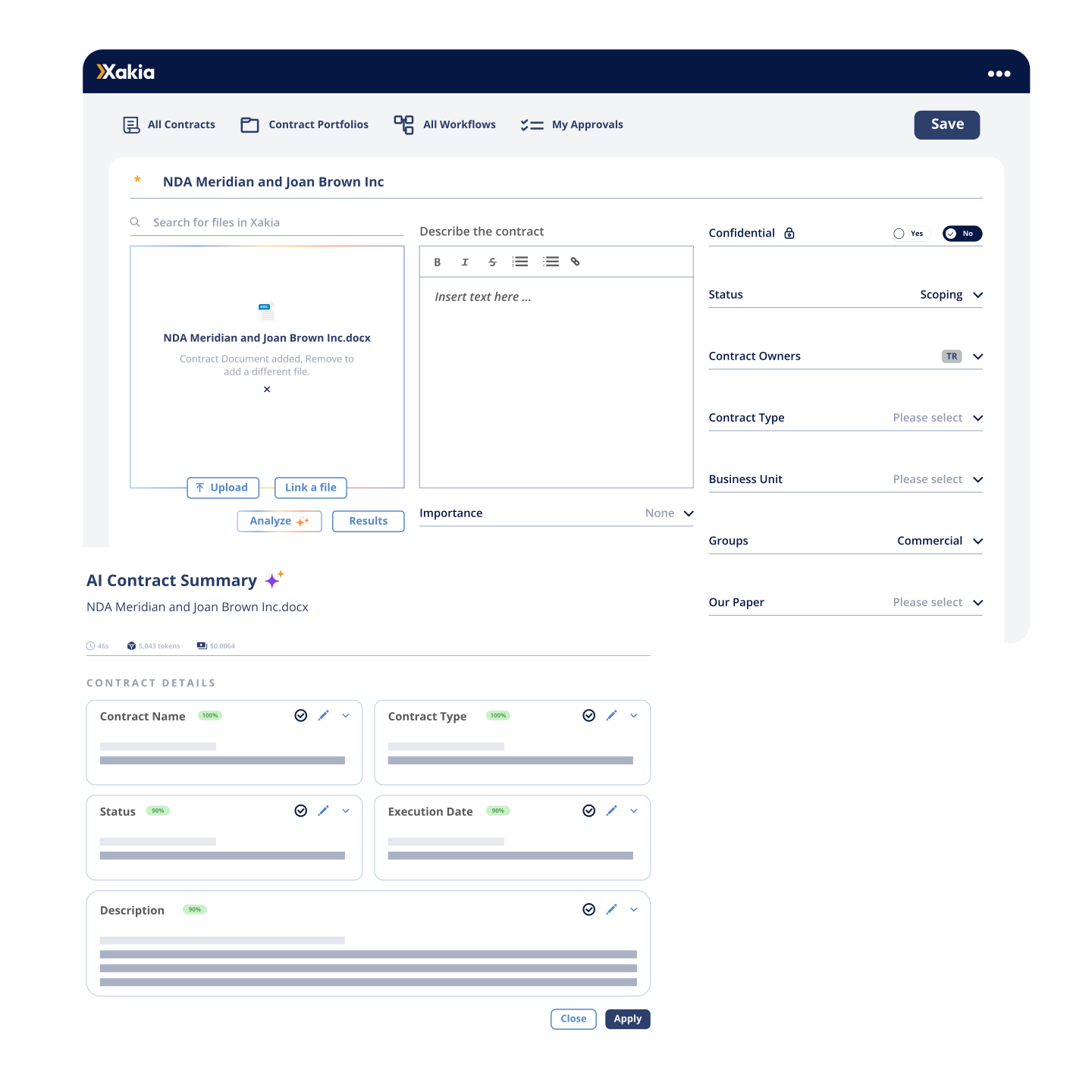
Xakia's AI reads the contract and pulls out the key terms, each with a confidence score, the clause it came from and the exact text it relied on. You review each value, fix anything that's off, and click Apply. Nothing lands in your contract repository until you say so.

AI Contract Summary
legal-documents-ai-search
 

Natural language search lawyers can actually use

Ask a lawyer where the week goes and searching is near the top. The contract with the cyber incident clause. The matter for the Singapore distributor. The advice someone on the team already wrote.

Most legal AI search is a black box. You type a question, results appear, and you have no idea what was actually searched or how to fix it when the results are wrong.

Xakia works differently. Describe what you're looking for in plain English and Smart Search builds the full search query for you. The query sits in the search bar where you can see it, edit it and save it to run again. The speed of natural language, with none of the mystery. 


Legal invoice review that catches what you don't have time to 

 Ask an in-house lawyer what they'd hand off first and invoice review comes up fast. Checking every line against the billing guidelines. Catching the invoice that went out to the wrong corporate entity, again.

We've watched this play out across hundreds of legal teams. The invoice arrives, there's no time to do more than glance at it, and it gets approved. The overcharge gets paid and nobody ever finds out it was there.

Xakia's AI checks every invoice against your billing guidelines and standard billing hygiene rules: block billing, duplicate entries, round-number billing, time-increment breaches. It compares the invoice file against what was submitted, so mismatched totals, tax and vendor details get flagged too. You review what it finds, waive what doesn't matter, and every decision lands in the audit trail.

You decide what happens next. Waive a finding (with a reason) or resolve it, and reverse either if you change your mind. Every action is recorded in the invoice history. When an invoice needs fixing, Generate Amendment Message drafts the note from the open findings, and you send it yourself. 

The manual work goes away. The relationship with your firms doesn't. 

ai-invoice-review
 

Ask Xakia questions from the AI you already use

Plenty of legal teams already work in Claude or Microsoft Copilot every day. Now you can point Claude at your own Xakia data. 

The Xakia MCP Connector is live in the Claude Connectors Directory. Add it in Claude Desktop, sign in with your Xakia credentials and ask about your matters, contracts, key dates, documents, Playbooks and Custom Logs. It's read-only, and you only see what you can already see in Xakia. It's included in All-In, and Microsoft Copilot is coming soon.

Admins stay in charge. The connector is off until an Admin turns it on, and they can limit it to Admins or switch it off at any time. We don't keep a copy of what's sent to Claude. We keep an audit record of who used it and which records they accessed for up to 12 months, without the search text or record contents.


Your data stays yours

Xakia AI is opt-in. Nothing runs until an Admin turns it on, and turning it on accepts our AI Addendum for your organization. We don't train AI models on your inputs or outputs, and neither do our third-party AI providers. You own what the AI produces.

AI requests are processed within the Microsoft-defined data zone for your region, which can be a different location from where your Xakia data is stored. Xakia AI doesn't give legal advice and, like any AI, it can make mistakes, so it's built for use by or under the supervision of a qualified lawyer. ISO 27001 certified, SOC 2 Type II, and HIPAA compliant. 

 
Questions about Xakia AI 

AI Contract Extract and Summary reads the contract and fills in the contract details, lifecycle dates, governing law and your Key Terms. Each value shows a confidence score, the section it came from and the exact text it relied on, so you can check it in seconds. Nothing is saved until you click Apply and then Save. 

Yes. In the Xakia Word Add-In, AI Document Review and Redlining reviews the contract against your Playbook, the governing law, market practice and drafting quality, then gives you an Executive Summary, a Playbook Scorecard and an assessment of every clause. Your lawyers work through the issues and apply, comment on or ignore each suggested redline. 

It takes the first pass off your team: reading contracts, pulling out key terms, checking law firm invoices against your Billing Guidelines and writing Global Search queries. Your lawyers spend their time on the judgment calls. 

No. Xakia AI doesn't give legal advice and, like any AI, it can make mistakes. It's built to be used by or under the supervision of a qualified lawyer. 

No. We don't train AI models on your inputs or outputs, and neither do our third-party AI providers. You own what the AI produces. 

Xakia AI is included in Enterprise and All-In. On Advance and Professional, it's available as the AI Access add-on. All-In has no usage caps, subject to fair use. 

"I talk to in-house legal teams every week. The number one complaint hasn’t changed in ten years: too much work, not enough people. When I look at where the hours actually go, so much of it isn’t legal thinking. It’s reading, searching, summarizing. We built Xakia AI to give that time back.”

Give your team back the hours the AI can do.