Xakia AI connects Microsoft 365 Copilot and Claude to your matters, reviews contracts against your Playbook, extracts key terms and checks invoices. Your lawyers make every call.
Ask Xakia questions from the AI you already use
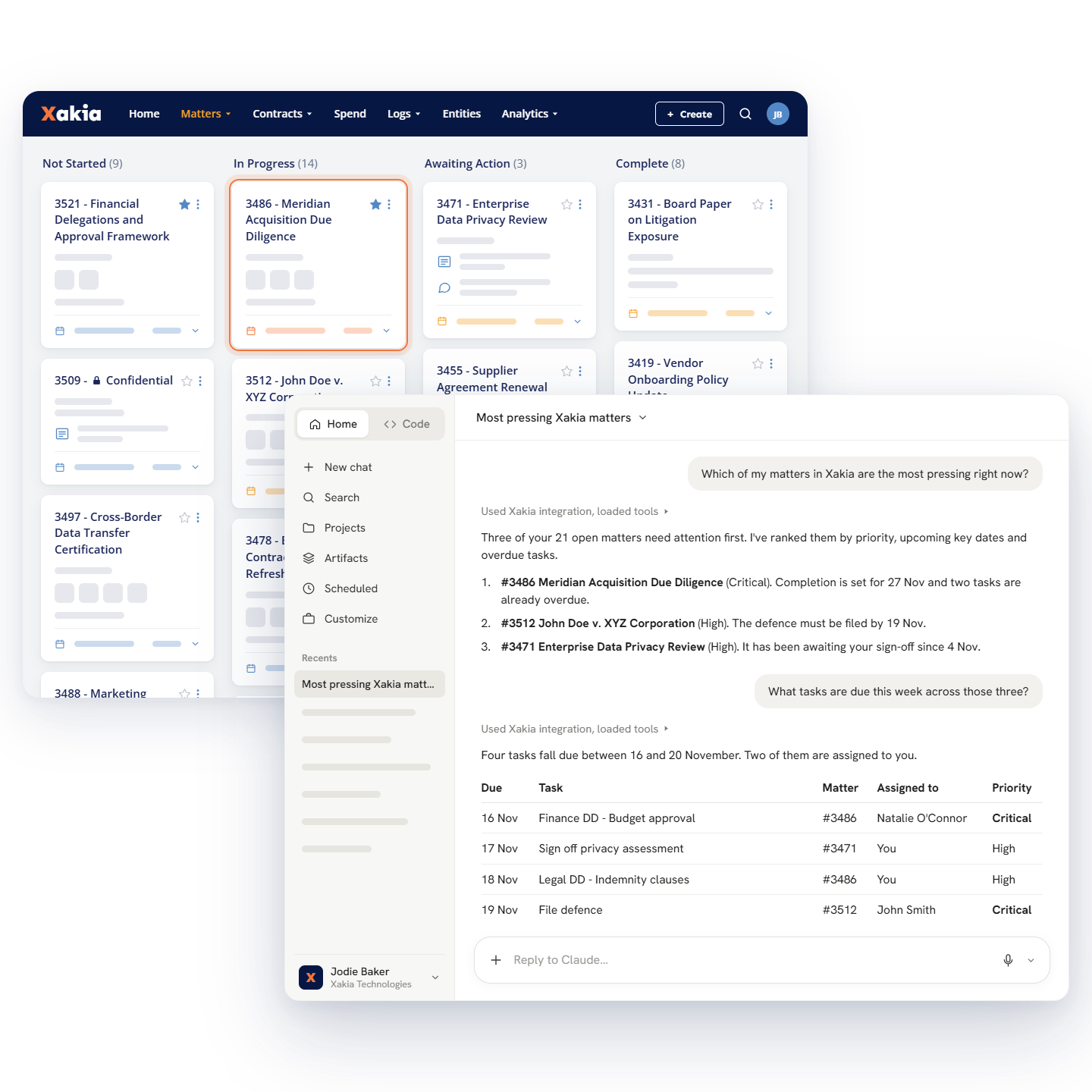
The Xakia MCP Connector lets you ask about your matters, contracts, key dates and Playbooks from Microsoft 365 Copilot and Teams, Claude, ChatGPT or Gemini. You only see what you can already see in Xakia, and your lawyers check what comes back. Try it on any plan for a limited time.
Ask which key dates fall due in the next 14 days, grouped by matter
Get a matter’s status and a draft status email in one go
Check a draft against your Playbook
AI contract review against your Playbook
Open a third-party contract in the Xakia Word Add-In and Xakia AI reviews it against your Playbook, the governing law, market practice and drafting quality, in minutes. It flags where the agreement departs from your Playbook or the market norm and suggests the redline, and your lawyers make the calls without leaving the document.
Set the review to Light, Standard or Thorough
Apply each suggestion as a tracked change or a margin comment, or ignore it
Build a Playbook for each contract type, with up to 3 positions per clause: Must Have, Want and Will Accept
Key terms extracted before anyone opens the document
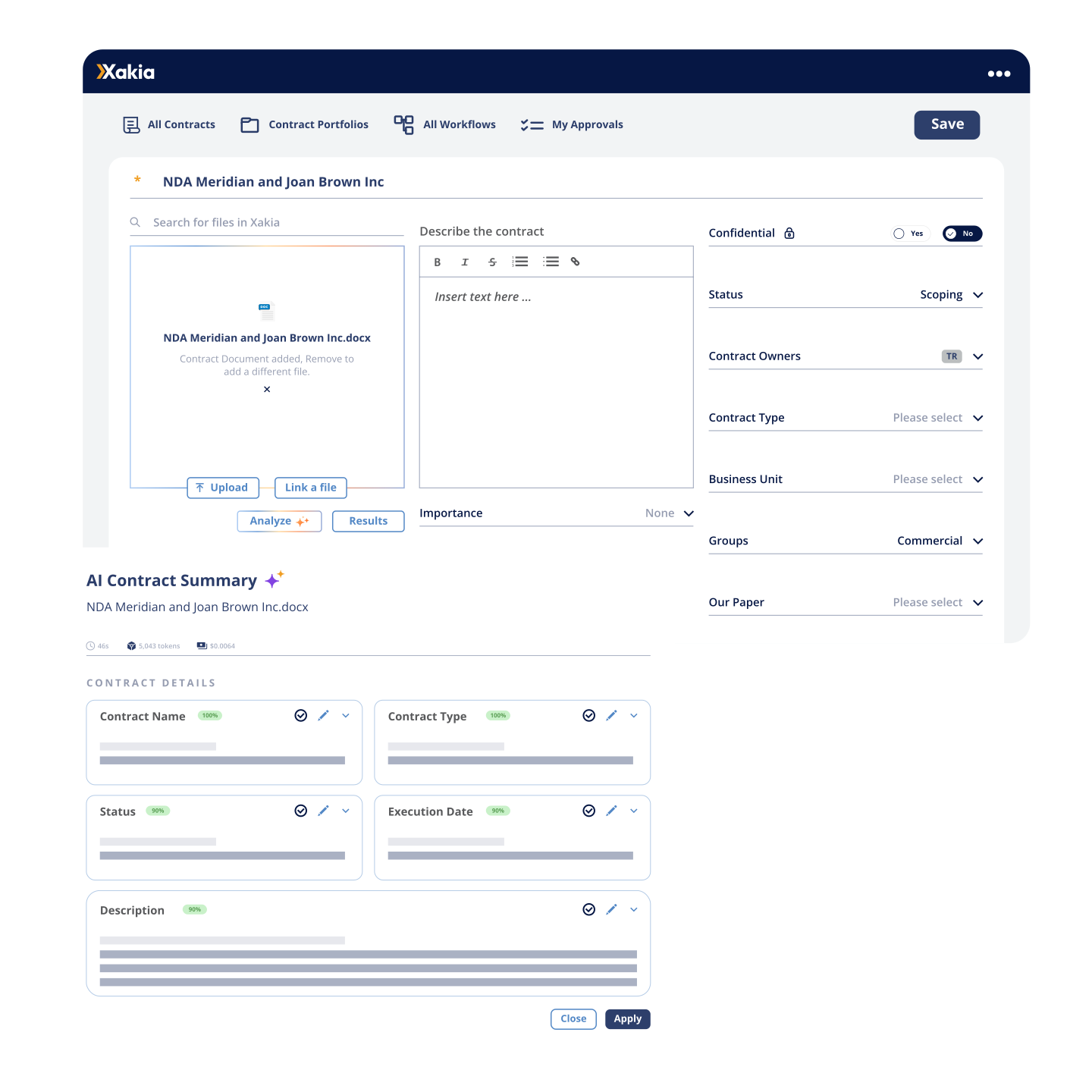
Xakia AI reads the contract and pulls out the key terms, such as expiry dates, liability caps, termination clauses and auto-renewal terms.
A confidence score on every value
The clause each term came from, and the exact text it relied on
Nothing lands in your contract repository until you review it
Legal invoice review that catches what you don't have time to
Xakia AI checks every invoice against your Billing Guidelines and standard billing hygiene rules, and compares the invoice file with what was submitted. You decide what happens to each finding, and every decision is recorded in the invoice history.
Flags block billing, duplicate entries, round-number billing and time-increment breaches
Waive a finding with a reason, or resolve it, and reverse either if you change your mind
Generate Amendment Message drafts the note to the firm from the open findings, and you send it yourself
Invoices move on through your approval workflow to finance for payment
Natural language search lawyers can actually use
Describe what you’re looking for in plain English and AI search builds the full search query for you. The query sits in the search bar, so you can see exactly what was searched.
Find the contract with the cyber incident clause, or the matter for the Singapore distributor
Edit the query when the results aren’t right
Save the query to run again
Where Xakia AI draws the line
Xakia AI works on the workflow around legal work, and every result comes back to a person before anything changes. The legal judgment stays with your lawyers.
You check key terms before they’re saved
You decide what happens to each invoice finding
You see and edit every search query
Your lawyers check what your AI assistant drafts from your Xakia data
Your data stays yours
Xakia AI is opt-in. Nothing runs until an Admin turns it on, which accepts our AI Addendum for your organization. Xakia AI doesn’t give legal advice and can make mistakes, so it’s built for use by or under the supervision of a qualified lawyer.
We don’t train AI models on your inputs or outputs, and neither do our third-party AI providers
AI requests are processed within the Microsoft-defined data zone for your region, which can differ from where your Xakia data is stored
ISO 27001 certified, SOC 2 Type II and HIPAA compliant
Questions about Xakia AI
Xakia's legal AI tools include AI Contract Extract and Summary, which pulls key terms and dates out of your contracts; AI Invoice Compliance Review, which checks law firm invoices against your Billing Guidelines; AI search, which builds the search query for you from plain English; and AI Document Review and Redlining in the Xakia Word Add-In. The Xakia MCP Connector lets Claude, ChatGPT, Gemini and Microsoft Copilot Studio work from your own Xakia data. Every tool is opt-in and stays in the workflow, so your lawyers make the legal calls.
AI Contract Extract and Summary reads the contract and fills in the contract details, lifecycle dates, governing law and your Key Terms. Each value shows a confidence score, the section it came from and the exact text it relied on, so you can check it in seconds. Nothing is saved until you click Apply and then Save(auto-save is enabled when changes are applied if using Xakia’s document management functionality).
Yes. In the Xakia Word Add-In, AI Document Review and Redlining reviews the contract against your Playbook, the governing law, market practice and drafting and gives you an assessment of every clause. Your lawyers work through the issues and apply, comment on or ignore each suggested redline.
It takes the first pass off your team: reading contracts, pulling out key terms, checking law firm invoices against your Billing Guidelines and writing Global Search queries. Your lawyers spend their time on the judgment calls.
No. Xakia AI doesn't give legal advice and, like any AI, it can make mistakes. It's built to be used by or under the supervision of a qualified lawyer.
No. We don't train AI models on your inputs or outputs, and neither do our third-party AI providers. You own what the AI produces.
Try the Xakia MCPs on any plan for a limited time. After that, they're included with Enterprise and All-In. On Advance and Professional, Xakia AI is available as the AI Access add-on. All-In has no usage caps, subject to fair use.